Most developers reach for a single-board computer, only to discover they still need a microcontroller for real-time I/O. Then they need eMMC and extra storage. Then a separate AI accelerator. Then comes the custom wiring nightmare just to make everything talk to each other. As your app grows, you find yourself stacking extra boards, external controllers, and shaky communication links. The bill of materials skyrockets, and the integration headaches follow, all just to bridge the gap between Linux computing and real-time control.
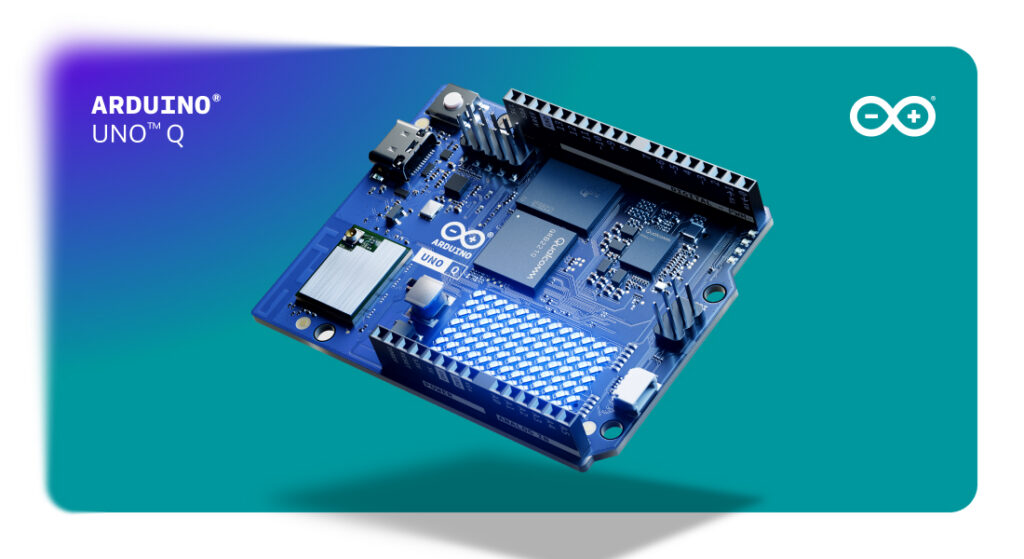
UNO Q starts where that frustration ends. One board. Qualcomm Dragonwing QRB2210 Linux-capable processor. Real-time STM32 MCU. Qualcomm® Adreno GPU 3D graphics accelerator. Forget unreliable SD cards with the built-in 32GB eMMC. It’s simple: one board, double the value.
When you can slash system complexity right out of the box, you instantly accelerate your development pipeline and cut down your total deployment costs. No extra fluff, just pure efficiency.
Let’s look under the hood: here are four reasons why UNO Q completely crushes overpriced, complicated hardware with a single, unified platform.
#1 Expect more from the right board
Many modern applications need two very different kinds of computing. On one side, there is the need for AI inference, computer vision, networking, data processing, and cloud connectivity, which all benefit from a Linux environment running on a powerful application processor. On the other side, there are sensors, actuators, motors, industrial signals, and timing-critical tasks that require deterministic real-time control.
Traditionally, developers solve this challenge by combining multiple boards and creating custom communication layers between them. UNO Q puts both worlds on the same board. The Linux MPU handles AI, vision, and data. The STM32 MCU handles sensors, actuators, and timing. They work together – and you don’t even need to design and debug the communication layer.
Of course there is value in having “two boards in one”. But there is potentially even more value in eliminating external hardware, reducing integration effort, and simplifying system architecture.
This approach is already proving valuable in real-world applications. Star Stream, for example, uses UNO Q to process and analyze high-speed racing telemetry data at the edge. The platform combines Linux-level processing power for data handling and visualization with the deterministic control needed to interact with physical systems in real time. The result is a solution capable of delivering professional-grade, real-time insights without requiring a complex multi-board architecture: it’s Formula 1 results, without the Formula 1 budget.
#2 Lessen the cost with fewer components
As you move on to more complex endeavors, it’s important to keep the bigger picture in mind: the purchase price of a board is only a small part of a project’s budget! Additional controllers, interface boards, communication modules, power supplies, and custom integration all contribute to the final cost of a solution.
UNO Q consolidates that BOM. Linux processing, real-time control, high-speed connectivity, and industrial I/O, all on one board. Fewer components means fewer integration points, fewer failure modes, and a bill of materials that doesn’t keep growing. A lot more applications can be built with fewer components and fewer integration challenges. The result is a lower total cost of ownership (TCO), even before considering maintenance, deployment, and long-term support.
A great, concrete example of this comes from ZenCell from PriscoZen, a company developing automated quality inspection systems. By leveraging the dual-brain architecture of UNO Q, they were able to consolidate functionality that would traditionally require multiple devices into a single platform. Fewer boards meant lower BOM cost, fewer integration points, simplified maintenance, and a cleaner overall system design. What’s not to love?
#3 Develop AI-native projects with less second guessing
If you are running an AI model, the real complexity often begins after inference is complete. You need to collect sensor data, make a decision, and trigger a physical response. This needs to be done reliably, in real time. That requires deterministic control, not a Linux process that can be preempted by the OS. Again, the dual-brain architecture of UNO Q can become particularly valuable from this perspective.
The Linux processor can handle AI models, vision pipelines, orchestration, and high-level decision making. Meanwhile, the microcontroller continues to manage sensors, actuators, and real-time interactions independently. The two processors complement each other naturally, allowing you to build systems that can both understand and react to their environment.
This architecture is especially relevant for applications such as visual inspection, predictive maintenance, robotics, smart gateways, and intelligent human-machine interfaces.
The RS DesignSpark team built a PCB inspection 4-part series (you can start with Part 1, here) that demonstrates this approach in practice. In the project, UNO Q handles image acquisition, machine learning workflows, and application logic while maintaining reliable interaction with the physical inspection environment. Rather than focusing solely on AI performance, the project showcases what is often more important in industrial deployments: connecting intelligence to action. The real kicker? Andrew told us he built the whole system for about $1,700 – with significant savings compared to similar systems starting at $3,000 and going all the way up to $20,000!
#4 Build it now, faster, and without friction
In many professional projects, engineering time can quickly exceed the cost of the hardware itself. Think about it: you need to prepare the environment, install the software stack, connect different tools, move data between systems, and create the infrastructure needed before real application development can even begin.
UNO Q helps reduce friction and speed up the process from the very first step. It ships with onboard eMMC and a preinstalled software environment. No SD card to format. No image to flash. No setup ritual before you can write a line of application code. With onboard eMMC storage and a preinstalled software environment, you can start working without first preparing removable media, flashing an operating system image, or assembling the basic development setup from scratch.
It also matters after deployment. In real-world systems, storage is not just a setup detail: it can affect reliability, maintenance, and uptime. Removable storage can be more exposed to corruption, wear, accidental removal, or failure, which may lead to downtime and additional recovery costs when a system needs to be reinstalled or reconfigured. By relying on onboard eMMC storage, UNO Q offers a more robust foundation for applications that are expected to run continuously and reliably. It also gives you flexibility in how you work with the board: it can be used connected to a PC during development, or run as a full standalone single-board computer (SBC) when the application needs to operate independently.
The advantage of adopting UNO Q becomes particularly clear in machine vision and inspection projects, where developers can focus on building the application itself rather than assembling the underlying infrastructure.
As author Andrew Back noted in his final words on Part 4 of the DesignSpark PCB inspection project, “UNO Q, Arduino® App Lab and Edge Impulse together provide a powerful combination, with a clear focus on convenience and enabling the rapid development of sophisticated applications.”
Understanding the full value of your hardware
At the end of the day, the greatest value is found in building a simpler, more efficient, more versatile and scalable system. UNO Q – with its unique combination of Linux computing, real-time control, edge AI readiness, and industrial-grade flexibility – is designed to reduce complexity rather than add it. And for developers building the next generation of intelligent devices, that may be the most valuable feature of all.
The real cost of a system is not what you pay for the board.
It’s the external MCU you didn’t have to buy. The AI HAT you didn’t need. The communication layer you didn’t have to build. The hours you didn’t spend on integration. The maintenance call you avoided, because eMMC doesn’t fail the way SD cards do. Every component you skip is money saved. Every integration point you eliminate is a failure mode removed.
The ultimate system cost isn’t the price of the board, it’s everything you no longer have to buy, wire, and fix. By packing Linux, edge AI, and real-time control onto a single board, UNO Q slashes your component list, cuts power consumption, and eliminates integration headaches. Zoom in, it does more; zoom out, it saves you more.
Want to dive deep into real-world applications that are proving the value of UNO Q? Read more about:
- How Star Stream created a smart, cost-effective solution to process and analyze high-speed racing telemetry data at the edge
- How ZenCell replaced two boards with one, to build a better quality inspection system
- How Andrew Back worked out automated visual inspection of PCBs, leveraging user-friendly training of AI/ML models made available by Edge Impulse
Qualcomm branded products are products of Qualcomm Technologies, Inc. and/or its subsidiaries. Arduino, UNO, and the Arduino logo are trademarks or registered trademarks of Arduino S.r.l.
The post Ditch overpriced hardware: 4 ways the Arduino® UNO™ Q board helps you do more for less appeared first on Arduino Blog.
Read more here: https://blog.arduino.cc/2026/06/11/ditch-overpriced-hardware-4-ways-the-arduino-uno-q-board-helps-you-do-more-for-less/