When talking about large language models (LLMs), people usually imagine a general-purpose assistant: something that can answer questions about weather, politics, software, history, travel, cooking, electronics – and almost any other topic. The model is expected to know a little bit about everything, follow open-ended conversations, and respond to a very broad range of prompts. That’s the experience most of us are used to, since cloud-based AI tools have become so widespread.
Embedded systems work in a much more “narrow” world. A robot does not need to discuss politics, an inspection system does not need to suggest vacation destinations, and a maintenance assistant installed near a machine does not need to explain ancient history. The system needs to understand the device, the task, the possible commands, the local data, and the actions that are safe to suggest or execute. The goal is to give an edge device enough language intelligence to become more useful, more understandable, and more independent from the network.
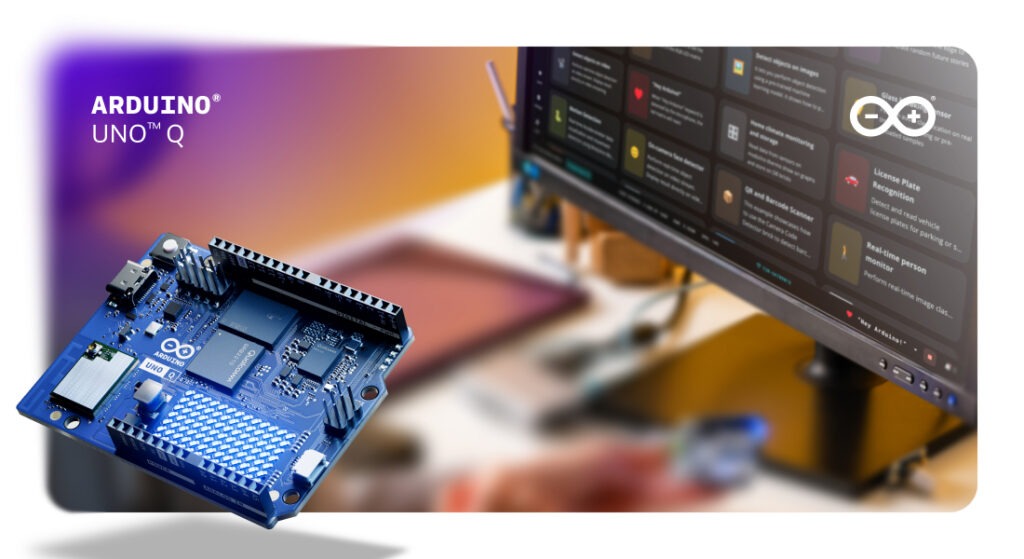
This is the framework in which we can think about local LLMs on UNO Q: a practical platform to explore this idea because it brings together a Debian Linux environment and the Arduino® hardware ecosystem. The Linux side can run local AI tools, command-line workflows, Python applications, web services, and inference runtimes. The Arduino side connects that intelligence to sensors, actuators, shields, Arduino® Modulino nodes, and real-world signals. This combination makes it possible to experiment with language models not as isolated chatbots, but as part of real embedded workflows.
The most important question to consider is not how to force a large model to run, but what kind of useful intelligence can live close to the data, close to the device, and close to the physical action?
Step 1: choose the right model for your use case
The edge is where smaller, optimized models become interesting. On the cloud, a large general-purpose model makes sense because it is expected to answer almost anything. On the edge, a model that has been trained, fine-tuned, distilled, or quantized for a specific domain can be more practical. It carries less unnecessary weight, focuses on the type of language the device actually needs, and can be integrated into a controlled application flow.
For example, in robotics the interaction can often be reduced to a limited set of useful instructions: move forward, stop, inspect this object, return to base, report battery level, explain the last error, switch to manual mode. The model can help interpret natural language, but the system should still map that interpretation to a controlled set of valid commands. This makes the behavior easier to test, easier to validate, and easier to trust.
That narrower scope is one of the reasons local LLMs can make sense on embedded platforms.
Step 2: understand your memory and storage constraints
A large language model usually has many parameters, and every parameter represents data that must be stored, loaded, and processed during inference. Model weights are only part of the story. During generation, the runtime also needs working memory for the prompt, the intermediate computation, and the key-value cache used by transformer models to keep track of previous tokens. As the context grows, memory usage grows too.
A 1B-parameter model in 4-bit quantization (such as Llama 3.2 1B Q4) occupies roughly 600–700 MB on disk and requires around 1 GB of RAM at runtime, including the KV cache for a short context window. A 3B model at the same precision pushes past 2 GB. These are numbers that matter on a board with fixed memory and storage, where the model must coexist with the OS, the runtime, and the rest of the application.
Quantization is one of the techniques that makes this more realistic. Instead of storing model weights with high-precision numerical values, a quantized model uses lower-precision representations. This reduces memory usage and can make inference possible on hardware that would otherwise be too constrained. In practical terms, quantization helps move a model from “too large to run locally” towards “small enough to experiment with” – while accepting a trade-off in accuracy, fluency, or speed depending on the model and runtime.
Model distillation is another important concept. In simple terms, distillation is a training approach where a smaller model learns from a larger teacher model. The goal is to keep useful behavior while reducing inference cost and memory footprint. A distilled model will not have the full breadth of the teacher, but it can be much more suitable when the application needs a focused capability on-device.
This example of running local LLMs and VLMs on UNO Q with yzma expands the conversation beyond text chat and explores local LLM and VLM workflows using yzma and llama, pointing toward a wider class of edge AI experiments where language models can work together with images, local data, and device context.
Step 3: identify where a local LLM adds real value
Local LLMs become even more useful when they are combined with other edge workflows. OCR is a good example. A camera connected to an UNO Q may extract text from a label, display, document, or machine interface. A compact language model can then summarize that text, classify it, or turn it into a structured response. The model only needs to process the relevant context, which keeps the workflow lighter and more focused.
The same principle applies to an UNO Q that collects logs, sensor readings, error states, or system events. A local model can turn that information into a short human-readable summary directly on the device. For a technician, this can transform raw data into something immediately useful – a compact explanation of the current status or a short description of the last error condition.
Step 4: design the architecture and set your boundaries
One of the most practical ways to think about local LLMs on UNO Q is to treat the model as an occasional reasoning layer. It can be called when language understanding, summarization, or interpretation adds value. Fast control loops, continuous monitoring, and timing-critical actions remain better suited to deterministic software running on the appropriate side of the system.
When working with local LLMs on UNO Q, developers should take into consideration a few practical parameters. Memory usage comes first: the model must fit comfortably together with the runtime and the rest of the application. Response latency comes next: a model that runs may still feel too slow if the use case expects instant answers. Storage should also be planned carefully, because model files and dependencies can be large.
The best entry point is the Arduino Project Hub tutorial Local LLM AI Chatbot on UNO Q, which walks through installing a small LLM and running it offline. It is a useful starting point because it demonstrates the basic shape of a local LLM application
There is also a natural bridge toward local agents. Agentic workflows can move beyond a simple chat interface and start coordinating tools, files, scripts, and actions. On UNO Q, this direction is especially interesting when the agent is treated as an orchestrator on the Linux side. It can inspect logs, prepare files, call scripts, interact with local tools, or help drive development workflows, while the hardware-facing layer keeps direct control over physical I/O.
This kind of setup requires clear boundaries. Giving an agent access to tools means giving it the ability to change things, so the environment should be designed carefully. A dedicated board can be a useful sandbox for this type of experimentation, with limited credentials, limited data access, and a specific set of allowed tools. This makes it possible to explore agentic workflows while keeping the system understandable and controlled.
If you prefer a familiar developer workflow, Installing Ollama on Arduino UNO Q covers a practical detail that matters a lot on embedded Linux systems: how to efficiently manage the resources available on the UNO Q to get the most out of it.
Step 5: run it, measure it, iterate
Pick one model, run it on the board, and pay attention to memory usage and response time for your specific prompt. That real-world data will tell you more than any benchmark – and it will give you a much clearer picture of where a local LLM fits in your next embedded project.
Local LLMs on UNO Q always balance power, cost, size, latency, privacy, reliability, and connectivity. The most interesting question is how much useful intelligence can be placed close to the data, the hardware, and the user. Because edge AI is not about more power. It’s about smarter choices. With the right model, the right architecture, and the flexibility of UNO Q, you can test local AI where it matters most: on real hardware, in real projects.
Start building with UNO Q and bring your AI ideas closer to the real world.
UNO Q is available to order from DigiKey, Farnell,Mouser, Newark, RS Components, and Robu.in; along with our other authorized distributors and resellers.
Arduino and UNO, and the Arduino logo are trademarks or registered trademarks of Arduino S.r.l.
The post Running local LLMs on the Arduino® UNO™ Q board: a practical guide appeared first on Arduino Blog.
Read more here: https://blog.arduino.cc/2026/06/18/running-local-llms-on-the-arduino-uno-q-board-a-practical-guide/